

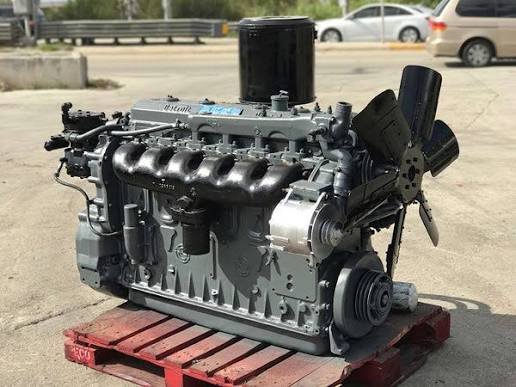
Detroit Diesel engines have kept a huge share of North American trucks, buses, and equipment moving for decades. The Series 60 alone earned a reputation as one of the toughest heavy-duty engines ever built, and the newer DD13, DD15, and DD16 now power a large part of today’s Freightliner and Western Star fleet.
Keeping these engines running well takes two things: accurate repair information and the right electronic tools. This guide walks through Detroit service manuals, diagnostic software, calibration and flash files, and how to match each one to your engine.
Start by Identifying Your Detroit Engine
Before buying any manual or software, find out exactly what you’re working on. Look for:
- Engine model: Series 50, Series 60 (11.1L, 12.7L or 14L), DD13, DD15, DD16, DD5, or DD8
- Engine serial number: Found on the engine label, usually on the valve cover or the block. It’s also readable from the ECM with diagnostic software.
- Electronic control system: DDEC II, III, IV, V, or VI on older engines, or the MCM/CPC-based system on the DD platform
- Model year and rating: Horsepower and torque rating, often listed on the engine label
The electronic control generation matters a lot. A DDEC IV Series 60 and a DDEC VI Series 60 look similar from the outside but use different electronics, wiring, and diagnostic procedures.
Detroit Service and Repair Manuals
A Detroit service manual is the core reference for any engine work. A complete one covers:
- Engine specifications and torque values
- Cylinder head, valve, and injector adjustment
- Fuel system and electronic unit injectors
- Lubrication, cooling, and air intake systems
- Turbocharger and EGR components on later engines
- Electrical systems, sensors, and ECM wiring
- Rebuild specifications and wear limits
A Detroit repair manual focuses more on disassembly, inspection, and rebuild procedures. For an in-frame overhaul, head gasket job, or injector replacement, you’ll want the detailed step-by-step version rather than a summary.
There’s also the operator’s and maintenance documentation, which covers service intervals, oil and coolant specs, and daily checks. If you’re focused on Detroit Diesel maintenance, start there, then keep the service manual handy for anything beyond routine servicing.
Tip: For DDEC engines, look for a manual that includes the troubleshooting section with fault code descriptions and wiring diagrams. Those pages save the most time when an engine throws a code or goes into derate.
Detroit Diesel Diagnostic Software
Modern Detroit engines are controlled by electronics, so good diagnostics start at the laptop. Detroit Diesel Diagnostic Link software (often called DDDL) connects to the engine through a compatible adapter and lets you:
- Read active and inactive fault codes
- View live data such as fuel pressure, boost, coolant temperature, and sensor readings
- Run cylinder cut-out tests and injector response tests
- Check and adjust parameters like road speed limits, idle shutdown, and cruise settings
- Review trip data and engine history
Engineering-level software goes further, giving access to deeper parameters and functions used by dealers and advanced shops. Our Detroit Diesel diagnostic and engineering software is built for technicians who need that level of access on supported Detroit engines.
When choosing DDDL software, check three things:
- Version compatibility: Older DDEC engines and newer DD engines are supported by different software versions. Confirm your engine is covered.
- Communication adapter: You’ll need an RP1210-compatible adapter that works with your laptop and the software.
- Operating system: Make sure your laptop runs a Windows version the software supports.
Calibration Files
The calibration is the set of data in the ECM that tells the engine how to run: fuel delivery, timing, horsepower and torque rating, governor settings, and more. You’ll typically need a calibration file when:
- Replacing an ECM: A new or used replacement module has to be loaded with the correct calibration for your engine before it will run properly.
- Restoring a factory setting: If an engine was previously reprogrammed, loading the correct factory calibration brings it back to its original rating.
- Matching an engine to its application: Highway, vocational, and bus applications each use different calibrations.
For example, a Detroit DDEC V 630hp calibration data file is built for a specific DDEC V engine configuration. Always match the calibration to your engine model, ECM type, and rating. Loading the wrong file can cause poor performance, warning lights, or a no-start.
Flash Files
A flash file is the data package used to reprogram, or “flash,” the ECM. People sometimes use “flash file” and “calibration file” interchangeably, but generally the flash file is the complete package written to the module, while the calibration is the engine-specific data inside it.
Before flashing an ECM:
- Back up the existing calibration if your software allows it
- Use a stable power supply or battery maintainer so voltage doesn’t drop mid-flash
- Confirm the file matches your ECM part number and engine serial range
- Don’t disconnect the adapter or let the laptop go to sleep during the process
An interrupted flash can leave a module unusable, so preparation matters more than speed.
Matching Everything Together
The most common mistake with Detroit engines is mixing up generations. Keep this simple rule in mind: the manual, software version, and calibration must all match the same engine and control system. A DD15 service manual won’t help with a DDEC IV Series 60, and an old software version may not even connect to a newer DD engine.
Write down your engine model, serial number, ECM type, and rating before you order anything. If you’re unsure, send those details to the seller and ask them to confirm compatibility.
Frequently Asked Questions
Where is the serial number on a Detroit Diesel engine?
On Series 60 engines it’s typically on the engine label on the valve cover and stamped on the block. On DD engines it’s on the engine label as well. Diagnostic software can also read it directly from the ECM.
What is DDDL software used for?
Detroit Diesel Diagnostic Link reads fault codes, shows live engine data, runs diagnostic tests, and lets you view or change certain engine parameters. It’s the main software tool for diagnosing Detroit electronic engines.
Do I need an adapter to use Detroit diagnostic software?
Yes. You need an RP1210-compatible communication adapter to connect your laptop to the truck’s diagnostic port.
What’s the difference between a calibration file and a flash file?
The calibration is the engine-specific data that controls fueling, timing, and rating. The flash file is the package used to write data to the ECM. In practice, both terms are often used for the file you load into the module.
Can I use a used ECM from another truck?
Often yes, if it’s the correct part number for your engine, but it will usually need to be loaded with the right calibration for your engine and application first.
Does one service manual cover all Series 60 engines?
Not always. Series 60 engines span several displacements and DDEC generations. Choose a manual that lists your engine size and control system.
What should I check before buying Detroit software or files?
Confirm the engine model, ECM type, and software or calibration version all match. Also check adapter and laptop compatibility for software.
Final Thoughts
Detroit engines reward good maintenance and accurate information. Get the right service manual for repairs, the right diagnostic software for troubleshooting, and the correct calibration when an ECM needs programming. Take a few minutes to confirm your engine details, and every job after that gets easier.